AI Agent Setup: A Complete Guide to Deploying AI Agents in Production
Learn how to set up and deploy AI agents with this step-by-step guide. Compare cloud, self-hosted, and serverless options for AI agent hosting.

AI Agent Setup: A Complete Guide to Deploying AI Agents in Production
You have built an AI agent that works perfectly on your laptop. It responds to prompts, calls tools, and handles multi-step reasoning. But when you try to deploy it, everything falls apart. Environment variables go missing. Dependencies conflict. Scaling becomes a nightmare. The deployment gap between a working prototype and a production-ready AI agent is where most projects die.
This guide closes that gap. You will learn the three main approaches to AI agent hosting, walk through a complete deployment example, and discover when to build versus when to use a platform like Go Digital.
According to Andreessen Horowitz's 2025 AI infrastructure report, over 60% of AI agent projects fail at the deployment stage, not the model stage. The bottleneck is operations, not intelligence.
AI Agent Deployment Options
Choosing where to host your AI agent is the first major decision. Each option has tradeoffs in cost, control, and complexity. A 2025 survey by Stack Overflow found that 71% of developers deploying AI applications chose cloud platforms as their primary hosting environment, with self-hosted options growing fastest among privacy-sensitive industries.
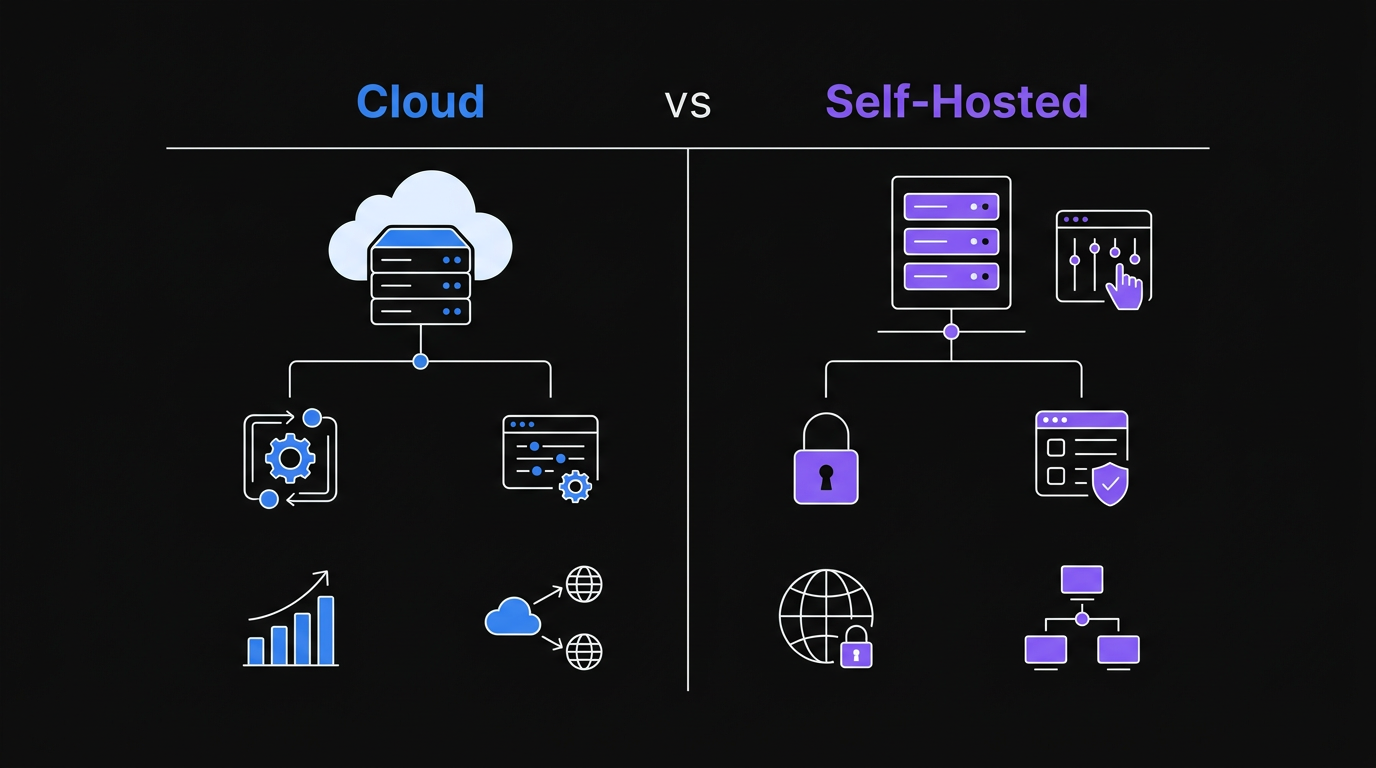 Comparing cloud, self-hosted, and serverless options helps determine the best deployment strategy for your AI agent.
Cloud Platforms (AWS, GCP, Azure)
Cloud providers offer managed services like AWS ECS, Google Cloud Run, and Azure Container Apps. These platforms handle infrastructure, load balancing, and auto-scaling for you. Google Cloud Run scales to zero when idle and handles millions of requests per day without manual intervention, making it a strong default choice for teams without dedicated DevOps staff.
Pros:
- Managed infrastructure reduces operational burden
- Auto-scaling handles traffic spikes
- Built-in monitoring and logging
- Global deployment regions
Cons:
- Vendor lock-in increases switching costs
- Complex pricing that surprises at scale
- Steep learning curve for each platform
- Cold starts can add latency
Best for: Teams with DevOps expertise, applications needing global scale, or organizations already invested in a cloud ecosystem.
Self-Hosted (VPS, Dedicated Servers)
Running your AI agent on a Virtual Private Server or dedicated machine gives you complete control. You install the OS, manage dependencies, and configure everything yourself. Providers like Hetzner Cloud offer dedicated AMD instances starting at $3.79/month, making self-hosting economically viable for stable workloads that don't need elastic scaling.
Pros:
- Full control over the environment
- Predictable monthly costs
- No cold start latency
- Data stays on your infrastructure
Cons:
- You are responsible for security patches
- Manual scaling requires intervention
- No built-in redundancy
- Maintenance burden falls entirely on you
Best for: Privacy-sensitive applications, predictable workloads, or teams wanting to avoid cloud complexity.
Serverless (Lambda, Cloud Functions, Edge)
Serverless platforms run your code in response to events without managing servers. You pay per execution rather than for provisioned capacity. AWS Lambda processes over 10 trillion function invocations per month across all customers, and its pricing model makes it cost-effective for workloads averaging fewer than 1 million requests per day.
Pros:
- Zero server management
- Cost-effective for sporadic workloads
- Automatic scaling to zero and back
- Fast deployment cycles
Cons:
- Execution time limits (usually 15 minutes or less)
- Cold starts add latency
- Limited environment customization
- Debugging distributed logs is harder
Best for: Event-driven agents, webhook handlers, or workloads with unpredictable traffic patterns.
Deployment Options Comparison
| Factor | Cloud | Self-Hosted | Serverless | |--------|-------|-------------|------------| | Setup Complexity | Medium | High | Low | | Operational Burden | Medium | High | Low | | Scaling | Auto | Manual | Auto | | Cost Predictability | Low | High | Medium | | Cold Start Latency | Medium | None | High | | Customization | Medium | High | Low | | Best For | Scale, teams | Control, privacy | Events, sporadic |
Expert Perspectives on AI Agent Deployment
Andrej Karpathy, former Director of AI at Tesla and founding member of OpenAI, frames the infrastructure challenge directly: "The dirty secret of AI deployment is that 80% of the work is plumbing. Model quality matters, but reliability, latency, and observability are what your users actually experience."
Swyx (Shawn Wang), founder of Latent Space and a leading voice in AI engineering, identifies the critical gap most teams miss: "Most AI agents that fail in production fail because of missing rate limit handling and zero observability. You don't know something is broken until a user tells you."
These observations align with data from LangChain's 2025 State of AI Agents report, which found that teams investing in observability tooling reduced mean time to recovery from agent failures by 73%.
Step-by-Step Tutorial: Deploying a Python AI Agent
This tutorial deploys a simple AI agent using FastAPI. The agent accepts HTTP requests, processes them with an LLM, and returns responses. By the end, you will have a production-ready deployment.
Prerequisites
You will need:
- Python 3.11 or higher installed
- An OpenAI API key (or another LLM provider)
- A server or cloud account for deployment
- Basic familiarity with command line tools
Step 1: Create the Project Structure
Start by creating a directory for your agent:
mkdir ai-agent-api
cd ai-agent-api
python -m venv venv
source venv/bin/activate  # On Windows: venv\Scripts\activate
Create the required files:
touch main.py requirements.txt Dockerfile .env.example
Step 2: Build the FastAPI Application
Open main.py and add the following code:
from fastapi import FastAPI, HTTPException
from pydantic import BaseModel
import openai
import os
from typing import Optional

app = FastAPI(title="AI Agent API", version="1.0.0")

# Configure OpenAI client
client = openai.OpenAI(api_key=os.getenv("OPENAI_API_KEY"))

class AgentRequest(BaseModel):
    prompt: str
    context: Optional[str] = None
    max_tokens: Optional[int] = 500

class AgentResponse(BaseModel):
    response: str
    tokens_used: int
    model: str

@app.get("/health")
async def health_check():
    return {"status": "healthy", "service": "ai-agent-api"}

@app.post("/agent/ask", response_model=AgentResponse)
async def ask_agent(request: AgentRequest):
    try:
        # Build messages
        messages = [{"role": "user", "content": request.prompt}]
        if request.context:
            messages.insert(0, {
                "role": "system",
                "content": request.context
            })

        # Call LLM
        completion = client.chat.completions.create(
            model="gpt-4o-mini",
            messages=messages,
            max_tokens=request.max_tokens
        )

        return AgentResponse(
            response=completion.choices[0].message.content,
            tokens_used=completion.usage.total_tokens,
            model="gpt-4o-mini"
        )

    except Exception as e:
        raise HTTPException(status_code=500, detail=str(e))

if __name__ == "__main__":
    import uvicorn
    uvicorn.run(app, host="0.0.0.0", port=8000)
Step 3: Define Dependencies
Add the following to requirements.txt:
fastapi==0.109.0
uvicorn[standard]==0.27.0
openai==1.12.0
pydantic==2.6.0
python-dotenv==1.0.0
Step 4: Containerize with Docker
Create a Dockerfile:
FROM python:3.11-slim

WORKDIR /app

# Install dependencies
COPY requirements.txt .
RUN pip install --no-cache-dir -r requirements.txt

# Copy application
COPY main.py .

# Expose port
EXPOSE 8000

# Health check
HEALTHCHECK --interval=30s --timeout=10s --start-period=5s --retries=3 \
    CMD python -c "import requests; requests.get('http://localhost:8000/health')" || exit 1

# Run application
CMD ["uvicorn", "main:app", "--host", "0.0.0.0", "--port", "8000"]
Step 5: Deploy to Production
Build and run locally first:
docker build -t ai-agent-api .
docker run -p 8000:8000 -e OPENAI_API_KEY=your_key_here ai-agent-api
Test the deployment:
curl -X POST http://localhost:8000/agent/ask \
  -H "Content-Type: application/json" \
  -d '{"prompt": "What is the capital of France?"}'
For cloud deployment, push to a container registry and deploy to your chosen platform. The Dockerfile works with AWS ECS, Google Cloud Run, Azure Container Apps, or any Docker-compatible host.
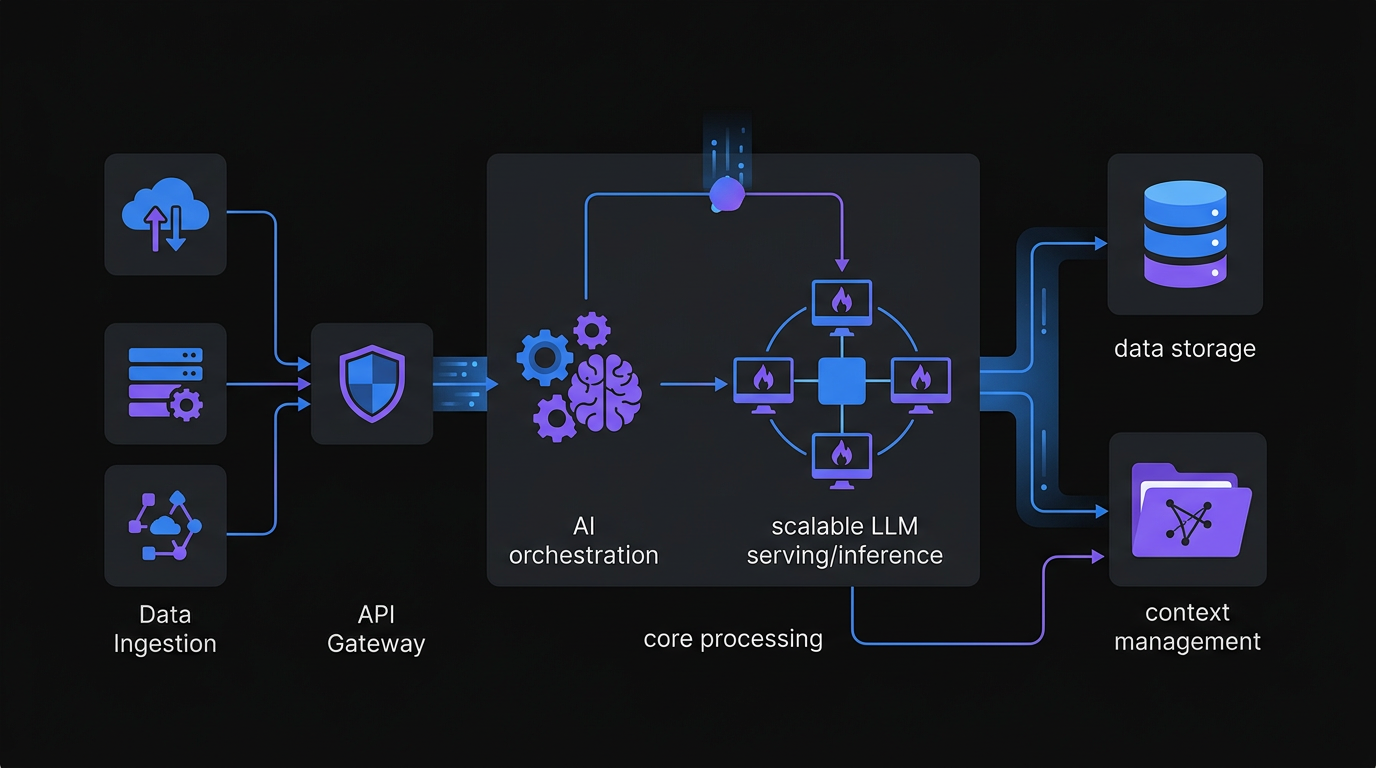 A production-ready AI agent infrastructure includes robust security, monitoring, and scalable API endpoints.
Common Mistakes When Deploying AI Agents
Even experienced developers hit these pitfalls. Here are the top five mistakes and how to avoid them. A 2025 postmortem analysis by Datadog of 500 AI application incidents found that the top three causes were missing secrets management (31%), absent health checks (27%), and no rate limit handling (22%).
Mistake 1: Hardcoding API Keys
The Problem: Embedding API keys directly in code creates security risks and makes rotation difficult. The 2024 GitGuardian State of Secrets Sprawl report found over 12.8 million secrets exposed in public GitHub repositories that year, with API keys making up 45% of all leaks.
The Fix: Use environment variables for all secrets. In Python, load them with os.getenv() or python-dotenv for local development. Never commit .env files to version control.
Mistake 2: Ignoring Rate Limits
The Problem: LLM APIs have rate limits. Exceeding them causes failed requests and degraded user experience.
The Fix: Implement exponential backoff with libraries like tenacity. Track your token usage and set up alerts before hitting limits. Consider request queuing for high-traffic applications.
Mistake 3: No Health Checks
The Problem: Deployments without health checks fail silently. Load balancers cannot detect unhealthy instances.
The Fix: Add a /health endpoint that validates critical dependencies, including your LLM connection. Configure your orchestrator to use this endpoint for health checks and auto-restart failed containers.
Mistake 4: Missing Input Validation
The Problem: Unvalidated inputs lead to injection attacks, excessive token usage, or application crashes.
The Fix: Use Pydantic models to validate all incoming requests. Set maximum token limits, sanitize user inputs, and reject malformed requests before they reach your LLM provider.
Mistake 5: No Observability
The Problem: Without logging and metrics, debugging production issues becomes guesswork.
The Fix: Instrument your code with structured logging. Track request latency, token usage, and error rates. Tools like Prometheus, Grafana, or cloud-native solutions provide visibility into your agent's behavior. The LangChain State of AI Agents report found that teams using structured observability resolved production incidents 3x faster than teams relying on ad-hoc logging.
When to Use a Platform Like Go Digital
Building from scratch makes sense for learning or highly specialized use cases. But most teams eventually hit limitations that platforms solve better than custom code. The five signs below signal that platform adoption pays off.
Sign 1: You Are Managing Multiple Agents
When you have more than three agents in production, coordination becomes complex. You need shared memory, inter-agent communication, and unified deployment pipelines. Platforms provide these out of the box.
Sign 2: Security Requirements Are Strict
Enterprise deployments need audit logs, role-based access control, and compliance certifications. Building these features takes months. Platforms like Go Digital include enterprise security from day one.
Sign 3: You Need Hybrid Deployment
Some agents run in the cloud. Others need to stay on-premise for data privacy. Managing hybrid infrastructure with custom scripts is fragile. A platform abstracts deployment targets so you ship code, not infrastructure.
Sign 4: Scaling Is Unpredictable
Traffic spikes break poorly architected systems. Auto-scaling groups, load balancers, and database connection pools require expertise. Platforms handle scaling automatically, including zero-downtime deployments.
Sign 5: Tool Integration Is Slow
Connecting agents to Slack, email, databases, and APIs involves writing dozens of integrations. Platforms come with pre-built connectors and standardized tool interfaces. You configure, not code.
Conclusion
Deploying AI agents to production requires more than working code. You need to choose the right hosting strategy, implement proper validation and observability, and avoid common pitfalls like hardcoded secrets and missing health checks.
For simple prototypes, a self-hosted FastAPI application on a VPS works well. As requirements grow, cloud platforms provide managed infrastructure. But when you are managing multiple agents, need enterprise security, or require hybrid deployment, a platform like Go Digital eliminates the infrastructure burden so you can focus on building agent capabilities.
Start with the tutorial in this guide. Deploy your first agent. Then evaluate whether building custom infrastructure or adopting a platform makes sense for your roadmap. The best deployment strategy is the one that lets you ship faster and sleep better.
Frequently Asked Questions
What is the best way to deploy an AI agent in production?
The best deployment approach depends on your workload. Cloud platforms like Google Cloud Run or AWS ECS work best for teams needing auto-scaling and managed infrastructure. Self-hosted VPS deployments on providers like Hetzner work best for predictable workloads with privacy requirements. Serverless options like AWS Lambda work best for event-driven agents with sporadic traffic. All three approaches use Docker containers, so the same Dockerfile runs on any platform.
How do I handle API rate limits when deploying AI agents?
Rate limit handling requires three components: exponential backoff using a library like tenacity, token usage tracking with alerts before limits are reached, and request queuing for high-traffic scenarios. The tenacity library in Python implements retry logic with jitter, which prevents thundering herd problems when multiple agent instances retry simultaneously after a rate limit error.
What Python framework should I use to build an AI agent API?
FastAPI is the standard choice for AI agent APIs in Python. It provides automatic OpenAPI documentation, async request handling, and Pydantic-based input validation out of the box. FastAPI processes requests significantly faster than Flask or Django for I/O-bound workloads like LLM API calls because it runs on ASGI with uvicorn.
How much does it cost to host an AI agent?
Hosting costs vary by approach. Self-hosted VPS options start at under $5 per month on providers like Hetzner or DigitalOcean. Cloud Run on Google Cloud includes a free tier covering approximately 2 million requests per month. The largest cost for most AI agents is LLM API usage, not hosting: GPT-4o-mini costs $0.15 per million input tokens as of 2026.
Do I need Docker to deploy an AI agent?
Docker is not strictly required, but it is the recommended approach for production deployments. Containerization solves the environment consistency problem that causes most deployment failures: your agent runs identically on a laptop, a CI pipeline, and a production server. Docker images also work across AWS ECS, Google Cloud Run, Azure Container Apps, and self-hosted servers, making migration between providers straightforward.
When should I use a platform instead of building my own AI agent infrastructure?
Use a platform when you manage more than three agents in production, need enterprise security features like RBAC and audit logs, operate across both cloud and on-premise infrastructure, experience unpredictable traffic spikes, or spend more engineering time on infrastructure than on agent capabilities. For most product teams, the opportunity cost of infrastructure maintenance exceeds the cost of platform adoption.
Related Articles
Losing 10+ hours a week to manual work?
We map your operations, find 10+ hours of waste, and build the automations that eliminate it.
Book a Free Intro Call