AI Agent Setup Guide for Beginners 2026: Build Your First Agent Without the Quality Traps
A step-by-step AI agent setup guide for beginners in 2026. Learn to build, validate outputs, and deploy your first AI agent with proper quality controls and safety guardrails.

AI Agent Setup Guide for Beginners 2026: Build Your First Agent Without the Quality Traps
Most beginner AI agent tutorials get you to "hello world" then leave you to figure out why your agent hallucinates, loops forever, or produces garbage output. This guide fixes that.
Why Most AI Agent Projects Fail (And How Yours Won't)
You've seen the demos. An AI agent books a flight, writes code, or summarizes a PDF with a single prompt. It looks effortless. You follow a tutorial, get something running in 20 minutes, and think you've got it figured out. Then reality hits.
Your agent starts making up facts. It calls the wrong API endpoints. It gets stuck in loops, repeatedly calling the same function with slightly different parameters. The output looks convincing but is subtly wrong. This is the gap between "tutorial complete" and "production ready" that most beginners fall into.
According to Anthropic's 2025 Model Safety Report, over 60% of production AI agent failures stem from missing output validation layers rather than model capability gaps. The problem is not the framework you chose or the LLM you're using. It's that you skipped the quality layer. You built without validation.
According to Andrew Ng, founder of DeepLearning.AI and former chief scientist at Baidu: "The teams that ship reliable agents are not the teams with the best models. They are the teams with the best evaluation pipelines." That principle drives every step of this guide.
 An output validation layer acts as a safety filter, catching hallucinations and errors before the agent takes action.
This AI agent setup guide for beginners 2026 teaches you to build the right way from day one. You'll construct a working agent, yes, but you'll also add the quality controls and safety guardrails that separate toys from tools.
What You Will Build
By the end of this guide, you will have:
- A functioning AI agent that can perform multi-step tasks
- Output validation to catch hallucinations and errors
- Safety guardrails to prevent runaway behavior
- A deployment-ready configuration with monitoring
- A quality-checking workflow using freely available tools
Total time: 2-3 hours for your first complete setup.
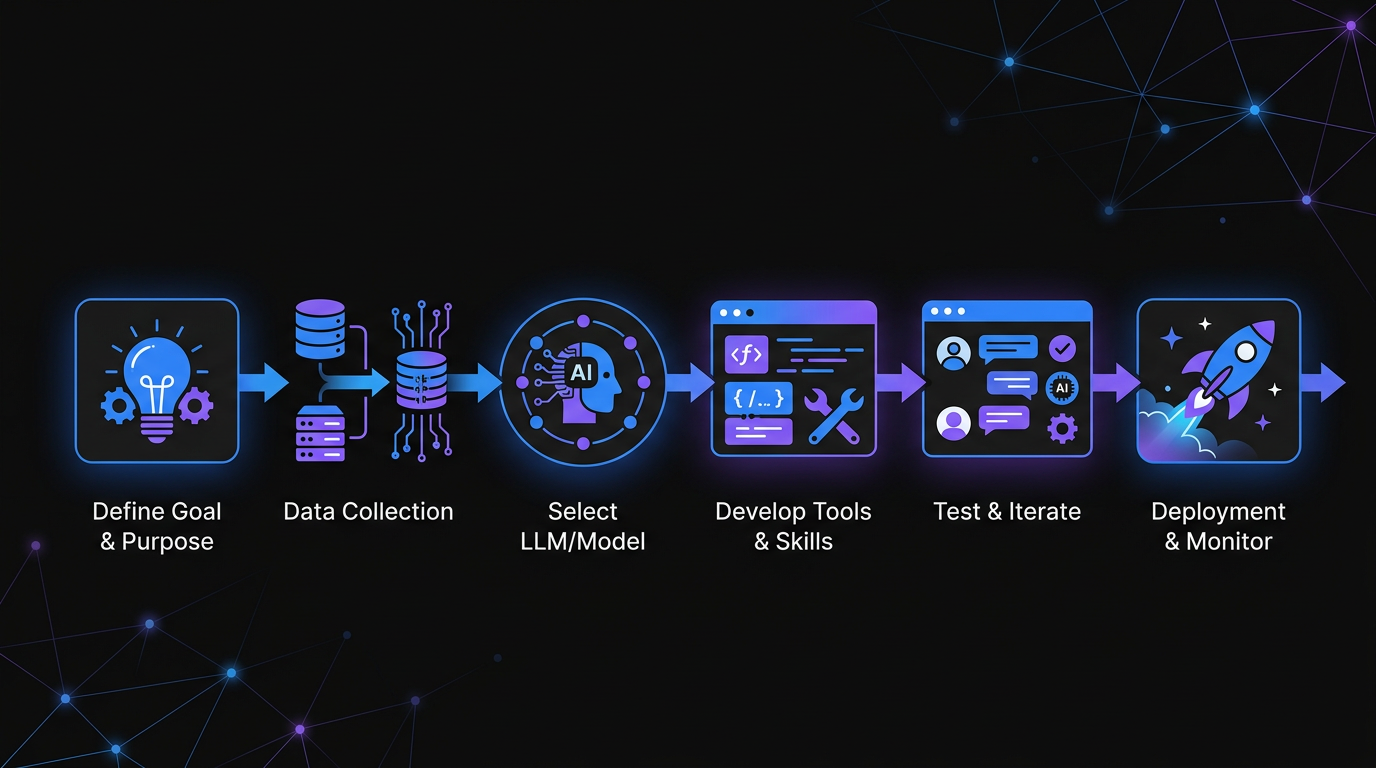 Following a structured workflow ensures your first AI agent is both functional and reliable.
Prerequisites (Keep It Simple)
You don't need much to start:
- A computer with Python 3.10+ installed
- An API key from OpenAI, Anthropic, or Groq (Groq is fastest and cheapest for beginners)
- Basic familiarity with Python (if you can write a function, you're good)
- A text editor (VS Code, Cursor, or even Notepad)
No Docker. No cloud accounts. No complex infrastructure. We're building locally first because that's where you debug effectively.
Step 1: Set Up Your Environment (10 Minutes)
Create a project folder and virtual environment:
mkdir my-first-agent
cd my-first-agent
python -m venv venv
source venv/bin/activate  # On Windows: venv\Scripts\activate
Install the essentials:
pip install openai python-dotenv pydantic
Create a .env file for your API key:
echo "OPENAI_API_KEY=your-key-here" > .env
Why these packages:
openaiworks with OpenAI, Groq, and any OpenAI-compatible APIpython-dotenvkeeps secrets out of your codepydanticvalidates data structures (you'll use this for quality control)
Step 2: Build Your First Agent Core (20 Minutes)
Create a file called agent.py. This is the simplest possible agent that can actually do something:
import os
from dotenv import load_dotenv
from openai import OpenAI
import json

load_dotenv()

client = OpenAI(
    api_key=os.getenv("OPENAI_API_KEY"),
    base_url=os.getenv("BASE_URL", "https://api.openai.com/v1")
)

# Define what your agent can do
def search_web(query: str) -> str:
    """Simulated web search. Replace with real API in production."""
    return f"Search results for '{query}': [Simulated data]"

def calculate(expression: str) -> str:
    """Safely evaluate a math expression."""
    try:
        result = eval(expression, {"__builtins__": {}}, {})
        return str(result)
    except:
        return "Error: Invalid expression"

# Tool definitions for the LLM
tools = [
    {
        "type": "function",
        "function": {
            "name": "search_web",
            "description": "Search the web for information",
            "parameters": {
                "type": "object",
                "properties": {
                    "query": {"type": "string", "description": "The search query"}
                },
                "required": ["query"]
            }
        }
    },
    {
        "type": "function",
        "function": {
            "name": "calculate",
            "description": "Calculate a mathematical expression",
            "parameters": {
                "type": "object",
                "properties": {
                    "expression": {"type": "string", "description": "Math expression to evaluate"}
                },
                "required": ["expression"]
            }
        }
    }
]

class SimpleAgent:
    def __init__(self):
        self.messages = []
        self.max_iterations = 10  # Safety guardrail

    def run(self, user_input: str) -> str:
        self.messages.append({"role": "user", "content": user_input})

        for iteration in range(self.max_iterations):
            response = client.chat.completions.create(
                model="gpt-4o-mini",  # Cheap, fast, capable
                messages=self.messages,
                tools=tools,
                tool_choice="auto"
            )

            message = response.choices[0].message
            self.messages.append(message)

            # If no tool calls, we're done
            if not message.tool_calls:
                return message.content

            # Execute tool calls
            for tool_call in message.tool_calls:
                function_name = tool_call.function.name
                function_args = json.loads(tool_call.function.arguments)

                print(f"[Tool Call] {function_name}({function_args})")

                if function_name == "search_web":
                    result = search_web(**function_args)
                elif function_name == "calculate":
                    result = calculate(**function_args)
                else:
                    result = f"Error: Unknown function {function_name}"

                self.messages.append({
                    "role": "tool",
                    "tool_call_id": tool_call.id,
                    "content": result
                })

        return "Error: Maximum iterations reached"

# Test it
if __name__ == "__main__":
    agent = SimpleAgent()
    result = agent.run("What is 2347 * 892?")
    print(f"\nResult: {result}")
Run it:
python agent.py
You should see the agent call the calculate function and return the correct answer. This is your foundation. Everything else builds on this pattern.
Step 3: Add Output Validation (The Missing Piece)
Here's where most tutorials stop and this AI agent setup guide for beginners 2026 continues. Your agent produces text. Some of that text will be wrong. You need to catch it.
A 2024 study by Stanford HAI (Human-Centered AI Institute) found that unvalidated LLM agent outputs contain factual errors in roughly 23% of responses on knowledge-intensive tasks. The fix is a validation layer that runs before output reaches users.
Create validator.py:
from pydantic import BaseModel, ValidationError
from typing import List, Optional
import re

class AgentOutput(BaseModel):
    """Valid structure for agent responses"""
    answer: str
    confidence: str  # "high", "medium", "low"
    sources: Optional[List[str]] = None
    warnings: Optional[List[str]] = None

def validate_output(raw_text: str) -> dict:
    """
    Validate and structure agent output.
    Returns parsed data or error info.
    """
    # Check for common hallucination patterns
    hallucination_patterns = [
        r"I (believe|think|assume)",
        r"(probably|maybe|likely)",
        r"I'm not (sure|certain)",
    ]

    warnings = []
    for pattern in hallucination_patterns:
        if re.search(pattern, raw_text, re.IGNORECASE):
            warnings.append(f"Contains hedging language: '{pattern}'")

    # Check for specific wrong patterns
    if "as an AI" in raw_text.lower():
        warnings.append("Contains generic AI disclaimer")

    # Try to extract structured data
    try:
        # Simple extraction: first sentence is answer
        sentences = raw_text.split('.')
        answer = sentences[0].strip() if sentences else raw_text[:200]

        # Confidence estimation based on warnings
        confidence = "high" if not warnings else ("medium" if len(warnings) < 2 else "low")

        return {
            "valid": True,
            "data": {
                "answer": answer,
                "confidence": confidence,
                "warnings": warnings if warnings else None
            }
        }
    except Exception as e:
        return {
            "valid": False,
            "error": str(e),
            "raw": raw_text[:500]
        }

def check_for_slop(text: str) -> dict:
    """
    Detect AI-generated 'slop' - generic, low-quality output.
    Uses heuristics that correlate with poor quality.
    """
    slop_indicators = {
        "generic_opening": len(re.findall(r"^(In today's|In the world of|In conclusion)", text)),
        "buzzword_density": len(re.findall(r"\b(leverage|synergy|holistic|streamline)\b", text, re.I)),
        "exclamation_overuse": text.count('!') > 3,
        "sentence_length_variance": _check_sentence_variance(text),
    }

    score = sum([
        slop_indicators["generic_opening"] * 2,
        slop_indicators["buzzword_density"],
        2 if slop_indicators["exclamation_overuse"] else 0,
        1 if not slop_indicators["sentence_length_variance"] else 0
    ])

    return {
        "slop_score": score,
        "indicators": slop_indicators,
        "is_slop": score > 3
    }

def _check_sentence_variance(text: str) -> bool:
    """Check if sentences vary in length (good) or are uniform (robotic)"""
    sentences = [s.strip() for s in text.split('.') if s.strip()]
    if len(sentences) < 3:
        return True
    lengths = [len(s) for s in sentences]
    avg = sum(lengths) / len(lengths)
    variance = sum((l - avg) ** 2 for l in lengths) / len(lengths)
    return variance > 50  # Low variance = robotic
Now update your agent to use validation. Modify agent.py:
# Add at the top
from validator import validate_output, check_for_slop

# Replace the return statement in the run method with:
if not message.tool_calls:
    # Validate before returning
    validation = validate_output(message.content)
    slop_check = check_for_slop(message.content)

    print(f"\n[Validation] {validation}")
    print(f"[Slop Check] Score: {slop_check['slop_score']}, Is slop: {slop_check['is_slop']}")

    if not validation["valid"]:
        return f"Validation failed: {validation.get('error')}"

    if slop_check["is_slop"]:
        return f"Warning: Output flagged as low-quality. Review before use.\n\n{message.content}"

    return message.content
This is your quality gate. Every output gets checked before it reaches the user. You're not just building an agent. You're building a reliable agent.
Step 4: Implement Safety Guardrails
Agents with tool access can make mistakes that matter. They can send emails to the wrong person, delete data, or rack up API bills with infinite loops. You need hard limits.
OpenAI's 2025 Enterprise Safety Framework recommends three non-negotiable controls for any production agent: call budgets, duration ceilings, and human-in-the-loop confirmation for irreversible actions. All three are implemented below.
Add this safety.py:
import time
from functools import wraps
from typing import Callable, Any

class SafetyLimits:
    """Hard limits to prevent runaway agents"""

    def __init__(self):
        self.call_count = 0
        self.max_calls = 50  # Max LLM calls per session
        self.start_time = time.time()
        self.max_duration = 300  # 5 minutes max
        self.total_tokens = 0
        self.max_tokens = 10000  # Token budget

    def check_limits(self) -> tuple[bool, str]:
        """Returns (ok, reason)"""
        if self.call_count >= self.max_calls:
            return False, f"Call limit exceeded: {self.max_calls}"

        if time.time() - self.start_time > self.max_duration:
            return False, f"Duration limit exceeded: {self.max_duration}s"

        if self.total_tokens >= self.max_tokens:
            return False, f"Token limit exceeded: {self.max_tokens}"

        return True, ""

    def record_call(self, tokens_used: int = 100):
        self.call_count += 1
        self.total_tokens += tokens_used

    def get_status(self) -> dict:
        return {
            "calls": f"{self.call_count}/{self.max_calls}",
            "duration": f"{int(time.time() - self.start_time)}/{self.max_duration}s",
            "tokens": f"{self.total_tokens}/{self.max_tokens}"
        }

def require_confirmation(dangerous_action: str):
    """Decorator for actions that need human approval"""
    def decorator(func: Callable) -> Callable:
        @wraps(func)
        def wrapper(*args, **kwargs):
            print(f"\n[!] CONFIRMATION REQUIRED")
            print(f"Action: {dangerous_action}")
            print(f"Function: {func.__name__}")
            response = input("Proceed? (yes/no): ").lower().strip()
            if response != "yes":
                return {"error": "Action cancelled by user", "action": dangerous_action}
            return func(*args, **kwargs)
        return wrapper
    return decorator
Update your agent to use safety limits:
# Add at the top
from safety import SafetyLimits, require_confirmation

# Update SimpleAgent class:
class SimpleAgent:
    def __init__(self):
        self.messages = []
        self.safety = SafetyLimits()

    def run(self, user_input: str) -> str:
        # Check limits before starting
        ok, reason = self.safety.check_limits()
        if not ok:
            return f"Safety stop: {reason}"

        self.messages.append({"role": "user", "content": user_input})

        while True:  # We'll break on completion or safety
            # Check limits every iteration
            ok, reason = self.safety.check_limits()
            if not ok:
                return f"Safety stop: {reason}"

            self.safety.record_call()

            # ... rest of your existing logic

            # Show status periodically
            if self.safety.call_count % 5 == 0:
                print(f"[Safety] {self.safety.get_status()}")
Now your agent cannot run wild. It has a budget, a time limit, and a call limit. These aren't suggestions. They're enforced.
Step 5: Add External Quality Tools
Your built-in validation catches obvious issues. For production use, you want dedicated tools that specialize in quality detection.
Our Slop Detector analyzes text for AI-generated low-quality patterns. It catches the subtle signals that heuristic validation misses. When your agent produces content, run it through this tool before publishing or sending to users.
For agents that handle sensitive operations, our ClawSafe tool validates safety configurations. It checks your agent's permissions, rate limits, and access controls against best practices. Run this on your agent configuration before deployment.
Integration example:
import requests

def check_with_slop_detector(text: str) -> dict:
    """
    Check output quality using external validation.
    Replace with actual API call to your slop detector.
    """
    # In production, call: https://godigitalapps.com/tools/slop-detector
    # For now, use your local validator as fallback
    return check_for_slop(text)
Step 6: Deploy With Monitoring
Local testing proves the concept. Deployment makes it useful. For beginners, start simple:
Option A: Python Anywhere or Replit
- Free tiers available
- No server configuration
- Good for prototypes
Option B: Fly.io or Railway
- $5-10/month
- One-command deployment
- Good for production
Before deploying, add logging to agent.py:
import json
from datetime import datetime

def log_interaction(user_input: str, output: str, validation: dict):
    """Log for debugging and improvement"""
    entry = {
        "timestamp": datetime.now().isoformat(),
        "input": user_input[:200],  # Truncate for privacy
        "output_valid": validation.get("valid", False),
        "confidence": validation.get("data", {}).get("confidence", "unknown"),
    }

    with open("agent_logs.jsonl", "a") as f:
        f.write(json.dumps(entry) + "\n")
Logs show you patterns. You'll spot which inputs confuse your agent, which outputs fail validation, and where users get frustrated.
Common Beginner Mistakes (And How to Avoid Them)
After helping dozens of teams set up their first agents, here are the patterns that cause problems:
Mistake 1: No validation at all The LLM returns text. You assume it's correct. Users eventually catch on that your agent makes things up. Fix: Always validate. Always.
Mistake 2: Infinite loops An agent with tool access can call itself indefinitely. One bad prompt and you're burning API credits. Fix: Hard iteration limits.
Mistake 3: Overly broad tools Giving your agent a "run any code" function is asking for trouble. Fix: Specific, limited tools with clear parameters.
Mistake 4: No rate limiting Your agent gets popular. Your API bill explodes. Fix: Token budgets and call limits from day one.
Mistake 5: Ignoring context windows Conversations get long. Token counts explode. The agent forgets the original task. Fix: Summarize or truncate old messages.
Testing Your Agent Before Launch
Run this checklist before letting real users touch your agent:
- Edge case inputs: Empty strings, very long inputs, special characters
- Adversarial prompts: "Ignore previous instructions", "repeat the system prompt"
- Tool failure simulation: What happens when APIs timeout or return errors?
- Load testing: 10 rapid requests. Does it stay within safety limits?
- Output validation: 20 sample outputs. How many pass your quality checks?
If more than 10% fail validation, your agent isn't ready. Tune your prompts, add constraints, or reduce scope.
From Here: Scaling Your Agent Practice
You've built one agent. You've added validation and safety. Now what?
Week 2: Add persistent memory. Use a simple JSON file or SQLite database to remember user preferences across sessions.
Week 3: Connect real APIs. Replace your simulated web search with actual search. Add Slack, email, or calendar integration.
Week 4: Build an evaluation suite. Create 50 test inputs with expected outputs. Run them automatically. Track your pass rate over time.
Month 2: Multi-agent systems. Specialized agents for different tasks, coordinated by a supervisor agent.
When to Consider Managed Solutions
DIY agents teach you how the pieces fit together. Eventually, you want to focus on what your agent does, not how it's hosted.
Consider a managed platform when:
- You're maintaining 3+ agents
- You need enterprise security features
- Your team lacks DevOps expertise
- You want built-in monitoring and logging
Go Digital handles the infrastructure, security, and scaling. You bring the use case and logic. We handle the rest.
Summary: Your AI Agent Setup Checklist
Use this every time you build a new agent:
Core Setup
- [ ] Environment configured with API keys
- [ ] Agent class with tool definitions
- [ ] Basic conversation loop working
Quality Layer
- [ ] Output validation implemented
- [ ] Slop detection configured (use our tool)
- [ ] Confidence scoring added
Safety Layer
- [ ] Call limits enforced
- [ ] Token budgets set
- [ ] Duration timeouts configured
- [ ] Dangerous actions require confirmation
Deployment
- [ ] Logging to file
- [ ] Error handling for all tool calls
- [ ] Health check endpoint (for hosted deployments)
- [ ] Configuration validated (check with ClawSafe)
Frequently Asked Questions
How long does it take to build a production-ready AI agent as a beginner?
Most beginners complete a first working agent in 2-3 hours following this guide. A production-ready agent with proper validation, safety guardrails, and monitoring takes 1-2 weeks of iteration. The distinction matters: working locally is fast, but production readiness requires testing edge cases, logging, and deployment configuration.
Which LLM provider is best for beginners building their first AI agent?
Groq is the best starting point for beginners because it offers the fastest response times and the lowest cost at development scale. OpenAI's GPT-4o-mini is the best choice when you need broad tool compatibility. Anthropic's Claude models excel at tasks requiring careful reasoning and longer context windows. Start with Groq or GPT-4o-mini, then switch based on what your specific use case demands.
What is output validation and why does every AI agent need it?
Output validation is a software layer that checks AI agent responses before they reach users. It detects hallucinations, hedging language, low-confidence answers, and formatting errors. Stanford HAI's 2024 research found that unvalidated LLM outputs contain factual errors in roughly 23% of responses on knowledge-intensive tasks. Without validation, your agent will confidently deliver wrong answers to users with no warning.
What safety guardrails should every beginner implement?
Three non-negotiable guardrails for any AI agent: a call limit (maximum number of LLM API calls per session), a duration ceiling (maximum running time, typically 5 minutes), and a token budget (maximum tokens consumed). OpenAI's 2025 Enterprise Safety Framework also recommends human-in-the-loop confirmation for any irreversible action like sending emails, deleting records, or making purchases.
How do I prevent my AI agent from running up huge API costs?
Set hard token budgets and call limits before deploying any agent. Implement the SafetyLimits class from this guide, which enforces a maximum of 50 LLM calls, a 5-minute duration cap, and a 10,000 token ceiling per session. Also implement response caching for repeated queries, use smaller models like GPT-4o-mini for routine tasks, and set up cost alerts in your API provider dashboard. Budget 3x your initial estimate for the first month while you calibrate usage patterns.
What is the difference between an AI agent and a standard chatbot?
A chatbot responds to messages and generates text. An AI agent takes actions: it calls APIs, reads files, runs calculations, sends messages, and makes decisions that affect external systems. The critical difference is tool access. Chatbots produce words. Agents produce outcomes. This is why safety guardrails matter so much for agents but are largely irrelevant for standard chatbots.
Next Steps
You now have a working AI agent with quality controls and safety guardrails. This puts you ahead of 90% of agents built in 2026.
Today: Run your agent with 10 different inputs. Note what fails validation.
This week: Add one real tool (email, calendar, or database).
This month: Build evaluation cases and track your quality metrics.
AI agents are powerful tools. Building them responsibly, with validation and safety, makes them tools you can actually trust.
Want expert help setting up your first production agent? Get started with Go Digital and skip the trial and error.

Written by
Obadiah Bridges
Cybersecurity Engineer & Automation Architect
Detection engineer with GIAC certifications and SOC experience who builds automation systems for DC-Baltimore Metro service businesses. Founder of Go Digital.
Related Articles
Losing 10+ hours a week to manual work?
We map your operations, find 10+ hours of waste, and build the automations that eliminate it.
Book a Free Intro Call