AI Agent Security Best Practices: A Practical Guide to Locking Down Your Agents
Learn AI agent security best practices to protect your systems from misconfigurations, over-permissions, and vulnerabilities. Includes real examples and audit strategies.

AI Agent Security Best Practices: A Practical Guide to Locking Down Your Agents
Your AI agents have access to your codebase, your APIs, and your data. If you have not audited their permissions recently, you have a problem. This guide shows you how to find and fix the security issues lurking in your agent configurations.
Why Agent Security Matters Now
AI agents are no longer experimental toys. They commit code, deploy infrastructure, process customer data, and interact with production systems. Yet most teams secure them like they are harmless chatbots.
Here is what happens when you get this wrong: an agent with excessive GitHub permissions accidentally deletes a production repository. A misconfigured tool allows an agent to expose sensitive environment variables in its outputs. An agent with broad API access gets tricked into making unauthorized transactions. A prompt injection attack turns your helpful assistant into a data exfiltration tool.
The attack surface is real. A 2024 study by researchers at Carnegie Mellon University found that over 60% of tested LLM-based agents were vulnerable to indirect prompt injection attacks that could cause them to execute unauthorized actions. Agents combine the risks of automated systems with the unpredictability of LLMs. Traditional security practices do not cover this gap because agents blur the line between user input and system action.
"The core problem is that AI agents are granted human-level trust in automated systems. They can read secrets, write files, call APIs, and send messages, all without the judgment a human would apply. Every permission an agent holds is a potential attack vector," says Simon Willison, creator of Datasette and one of the leading voices on LLM security.
Most security teams have not caught up. They are still focused on network perimeters and container vulnerabilities while agents operate with the equivalent of root access. This guide closes that gap with practical, implementable security practices.
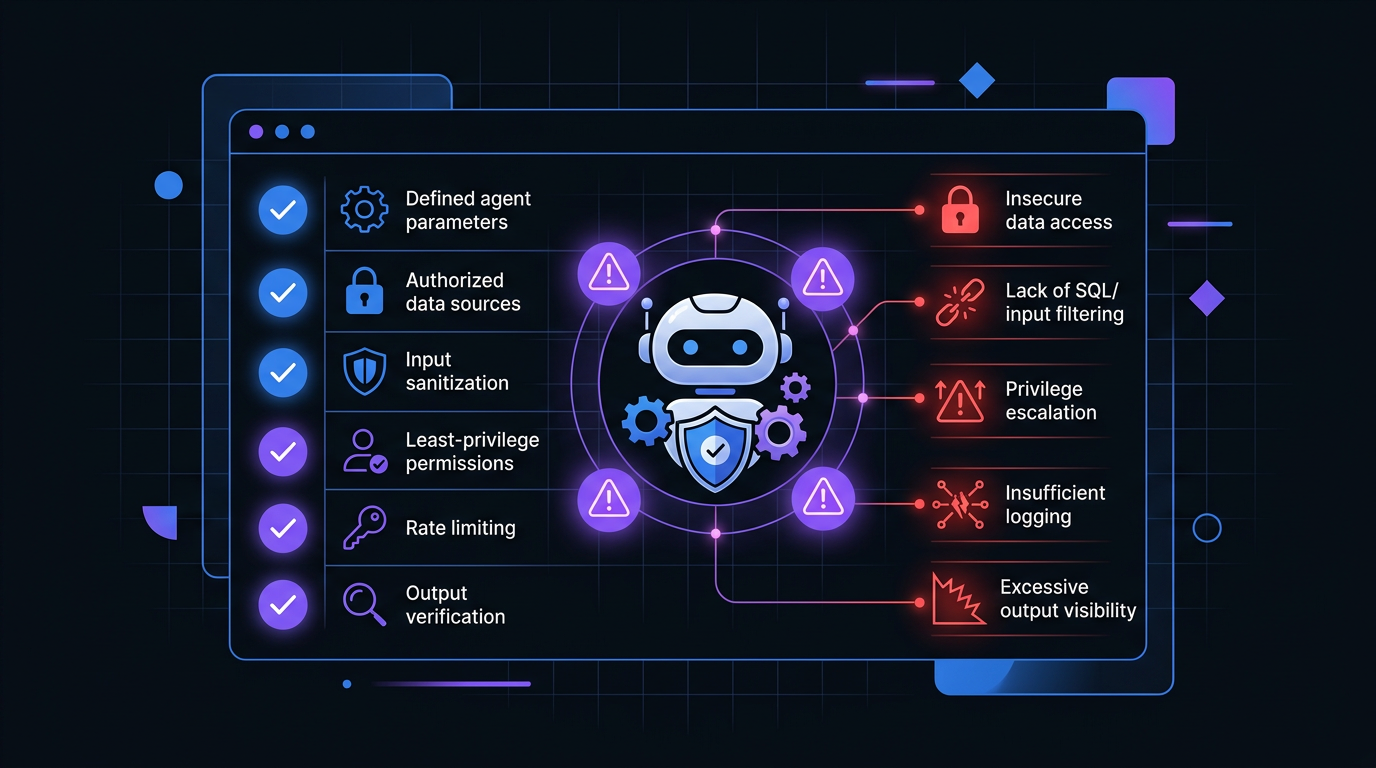 A security checklist for AI agent configuration helps identify common vulnerabilities before they reach production.
Common Misconfigurations (With Real Examples)
Security issues in AI agents almost always stem from configuration mistakes, not sophisticated attacks. Here are the patterns that appear most often.
1. Over-Permissioned Tool Access
Agents work through tools. When you give an agent a tool, you give it capabilities. The mistake is granting capabilities the agent does not need. The principle of least privilege, established by NIST as a foundational security control, applies directly to agent tool configuration: grant only the permissions required for the specific task, nothing more.
Bad configuration:
# agent-config.yaml
tools:
  - name: database
    permissions:
      - read
      - write
      - delete
      - schema_modify
  - name: email
    permissions:
      - send
      - read_all
      - delete
  - name: github
    permissions:
      - full_access
This agent can delete database tables, read everyone's email, and has full GitHub access. When you are building quickly, it is easier to grant broad permissions than to think through the minimal set required.
What ClawSafe flags:
When you run this configuration through ClawSafe, our security analyzer, you get:
[CRITICAL] Tool 'database' has DELETE permission without approval workflow
[CRITICAL] Tool 'github' has full_access - violates principle of least privilege
[WARNING] Tool 'email' has read_all without scope restriction
[RISK SCORE: 8.7/10] - High risk configuration detected
Better approach:
tools:
  - name: database
    permissions:
      - read
      - write
    restrictions:
      tables:
        - user_preferences
        - session_cache
      no_delete: true
      requires_approval_for:
        - write
  - name: email
    permissions:
      - send
    restrictions:
      max_per_hour: 10
      allowed_templates:
        - welcome_email
        - password_reset
  - name: github
    permissions:
      - read
      - create_pr
    restrictions:
      repositories:
        - frontend-repo
        - docs-repo
2. Missing Input Validation
Agents process user input. That input can be malicious. Without validation, attackers manipulate agents through prompt injection, context manipulation, or crafted payloads. OWASP's 2025 Top 10 for LLM Applications lists prompt injection as the number one vulnerability in production AI systems.
Bad configuration:
# No validation on user input
response = agent.run(user_input)
What ClawSafe flags:
[CRITICAL] Direct user input passed to agent without sanitization
[WARNING] No rate limiting on agent execution
[WARNING] Output not validated before action execution
Better approach:
from clawsafe import validate_input, sanitize_output

# Validate before processing
validated_input = validate_input(
    user_input,
    max_length=1000,
    forbidden_patterns=[r"ignore previous instructions", r"system prompt"],
    required_context={"user_id", "session_id"}
)

response = agent.run(validated_input)

# Validate before acting
safe_output = sanitize_output(response, allowed_actions=["query", "notify"])
3. Exposed Secrets in Context
Agents need context to work effectively. That context often includes API keys, database URLs, and tokens. The mistake is passing this information in ways the agent can echo back or leak.
Bad configuration:
system_prompt = f"""
You are a helpful assistant. Here are your tools:
- Database connection: {DATABASE_URL}
- API key: {API_KEY}
- AWS credentials: {AWS_ACCESS_KEY}
"""
What ClawSafe flags:
[CRITICAL] Hardcoded credentials detected in system prompt
[CRITICAL] Secrets exposed in agent context window
[WARNING] No secret rotation policy detected
Better approach:
# Use tool abstraction, not raw credentials
system_prompt = """
You are a helpful assistant with access to these tools:
- database_query (read-only access to user data)
- api_client (rate-limited external calls)
- file_storage (scoped to /uploads directory)

Credentials are managed by the tool layer. Do not request or expose them.
"""

# Tools handle authentication internally
# Agent never sees raw credentials
HashiCorp Vault and AWS Secrets Manager both support dynamic secret injection at the tool layer, which keeps credentials entirely out of the agent context window.
4. No Execution Boundaries
Agents can run indefinitely, make recursive calls, or spawn sub-agents. Without boundaries, a simple request turns into an expensive, potentially dangerous cascade.
Bad configuration:
agent = Agent(
    model="gpt-4",
    tools=[search, code_executor, deploy],
    # No limits defined
)
What ClawSafe flags:
[WARNING] No max_iterations limit set
[WARNING] No execution timeout configured
[CRITICAL] Tool 'deploy' can be called without approval
[WARNING] Recursive agent calls not restricted
Better approach:
agent = Agent(
    model="gpt-4",
    tools=[search, code_executor, deploy],
    limits={
        max_iterations=10,
        max_execution_time=30,  # seconds
        max_tokens_per_run=4000,
        require_approval_for=["deploy", "delete"],
        allow_recursion=False
    }
)
How to Audit Your Setup
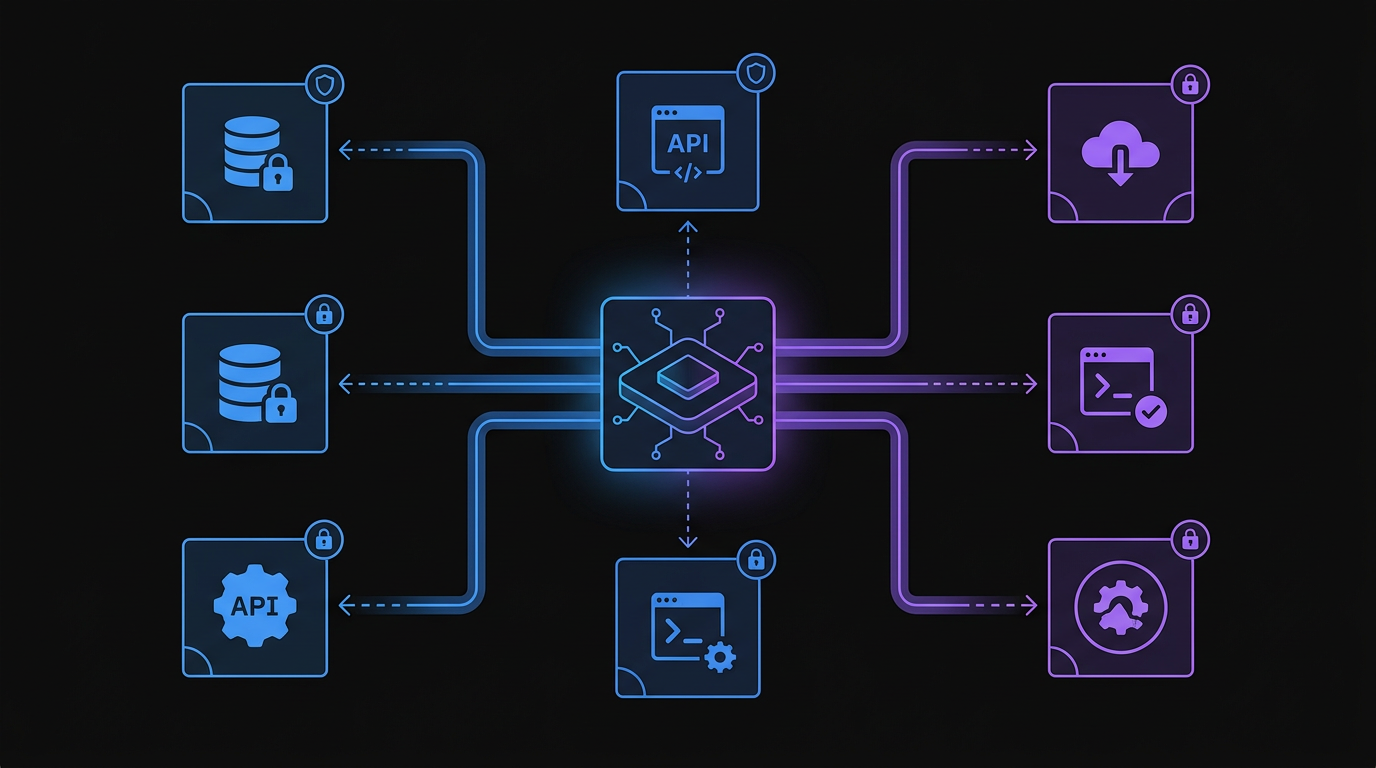 A secure AI agent architecture isolates tool permissions and enforces boundaries to prevent unauthorized actions.
Security audits for AI agents follow a different pattern than traditional application security. You check configurations, tool permissions, and behavioral boundaries.
Step 1: Inventory Your Agents
Document every agent running in your environment. Record what tools each agent has access to, what data it can read and modify, what systems it can interact with, and who deployed it and when. Most teams are surprised by how many agents are actually running. Shadow agents proliferate when developers can spin them up easily.
Step 2: Review Tool Permissions
For each tool an agent uses, verify: does the agent need this capability? Are there restrictions on how it can be used? Is there an approval workflow for destructive actions? Are rate limits in place?
Step 3: Check Input Handling
Review how user input reaches your agents. Verify that input is validated and sanitized, that length and complexity limits exist, that prompt injection protection is active, and that outputs are validated before execution.
Step 4: Verify Secret Management
Ensure no credentials are exposed. Check system prompts for hardcoded secrets. Verify API keys are not passed in context. Confirm tools handle authentication internally. Review logs for accidental secret exposure.
Step 5: Test Execution Boundaries
Confirm limits are actually enforced by attempting to exceed iteration limits, trying recursive agent spawning, testing approval workflows, and verifying timeout enforcement.
Automated Auditing with ClawSafe
Manual audits are thorough but time-consuming. ClawSafe automates this process:
# Analyze a configuration file
POST godigitalapps.com/api/clawsafe/analyze
Content-Type: application/json

{
  "config_path": "./agent-config.yaml",
  "strict_mode": true,
  "check_categories": ["permissions", "secrets", "boundaries"]
}
The API returns a detailed report:
{
  "risk_score": 6.2,
  "critical_issues": 1,
  "warnings": 4,
  "findings": [
    {
      "severity": "critical",
      "category": "permissions",
      "message": "Tool 'delete_user' lacks approval workflow",
      "recommendation": "Add requires_approval_for: ['delete_user']"
    },
    {
      "severity": "warning",
      "category": "secrets",
      "message": "Context window may contain sensitive data",
      "recommendation": "Review and sanitize context before each run"
    }
  ]
}
Automating Security Checks
Security that depends on manual reviews fails. You need automated checks that run continuously as part of your deployment pipeline.
Pre-Deployment Checks
Every agent configuration passes security validation before deployment:
# .github/workflows/agent-security.yml
name: Agent Security Check
on: [push, pull_request]

jobs:
  security-audit:
    runs-on: ubuntu-latest
    steps:
      - uses: actions/checkout@v4

      - name: Run ClawSafe Analysis
        run: |
          curl -X POST godigitalapps.com/api/clawsafe/analyze \
            -H "Content-Type: application/json" \
            -d @config/agent-config.json \
            | tee security-report.json

      - name: Check Risk Score
        run: |
          RISK=$(jq '.risk_score' security-report.json)
          if (( $(echo "$RISK > 7.0" | bc -l) )); then
            echo "Risk score $RISK exceeds threshold"
            exit 1
          fi
Continuous Monitoring
Security configurations drift over time. Monitor for new tools added without review, permission escalations, secret exposure in logs, and unusual agent behavior patterns. Datadog's LLM Observability and LangSmith both provide runtime monitoring specifically for agent behavior in production.
Runtime Protection
Even with good configuration, agents behave unexpectedly. Runtime protection includes input sanitization at the entry point, output validation before action execution, rate limiting on tool calls, and automatic suspension on anomaly detection.
API Integration for CI/CD
Security belongs in your pipeline, not as an afterthought. The ClawSafe API integrates directly into your deployment workflow.
Basic Integration
import requests
import sys

def audit_agent_config(config_path):
    with open(config_path) as f:
        config = f.read()

    response = requests.post(
        "https://godigitalapps.com/api/clawsafe/analyze",
        json={
            "config": config,
            "format": "yaml",
            "strict_mode": True
        }
    )

    result = response.json()

    if result["risk_score"] > 7.0:
        print(f"FAILED: Risk score {result['risk_score']} exceeds threshold")
        for finding in result["findings"]:
            if finding["severity"] == "critical":
                print(f"  [CRITICAL] {finding['message']}")
        sys.exit(1)

    print(f"PASSED: Risk score {result['risk_score']}")
    return True

if __name__ == "__main__":
    audit_agent_config("./agent-config.yaml")
Advanced Pipeline Integration
For teams managing multiple agents across environments:
# clawsafe-ci.py
import requests
import json
from pathlib import Path

def scan_agent_directory(directory, max_risk=6.0):
    configs = Path(directory).glob("**/*.yaml")
    failed = []

    for config_path in configs:
        result = analyze_config(config_path)

        if result["risk_score"] > max_risk:
            failed.append({
                "file": str(config_path),
                "score": result["risk_score"],
                "critical": result["critical_issues"]
            })

    if failed:
        print(f"\n{len(failed)} configurations failed security audit:")
        for item in failed:
            print(f"  - {item['file']}: risk {item['score']}")
        sys.exit(1)

    print(f"All configurations passed")

def analyze_config(path):
    with open(path) as f:
        content = f.read()

    response = requests.post(
        "https://godigitalapps.com/api/clawsafe/analyze",
        json={
            "config": content,
            "format": "yaml",
            "check_categories": [
                "permissions",
                "secrets",
                "boundaries",
                "injection"
            ]
        }
    )

    return response.json()

if __name__ == "__main__":
    scan_agent_directory("./agents", max_risk=6.0)
This runs as a gate in your CI/CD pipeline. No agent deploys without passing security validation.
Frequently Asked Questions
What is the most common AI agent security vulnerability? Over-permissioned tool access is the most common vulnerability. Developers grant broad permissions during development for convenience and never restrict them before production. The fix is applying the principle of least privilege to every tool an agent can access.
What is prompt injection? Prompt injection is an attack where malicious content in an agent's input overrides its intended instructions. Carnegie Mellon University research found that over 60% of tested LLM-based agents were vulnerable to indirect prompt injection. The defense is input validation that filters forbidden patterns before they reach the agent.
How do I prevent agents from exposing API keys? Never include credentials in system prompts or agent context. Use tool abstraction: build tools that handle authentication internally so the agent calls a function like database_query() rather than receiving the raw database URL. Use HashiCorp Vault or AWS Secrets Manager for dynamic credential injection at the tool layer.
Should security checks run in CI/CD? Yes. Security checks must be automated in your CI/CD pipeline to be effective. Manual reviews get skipped under deadline pressure. An automated gate that runs on every push catches misconfigurations before they reach production.
What execution limits should I set? Set a maximum iteration count of 10 to 20 steps. Configure an execution timeout between 30 and 120 seconds. Limit tokens per run to 4,000 to 8,000. Require human approval for destructive actions like delete and deploy. Disable recursive agent spawning unless your architecture specifically requires it.
How often should I audit agent configurations? Automated audits run on every configuration change through CI/CD. Manual reviews of permissions and behavior happen quarterly. Any time you add a new tool or expand permissions, run a security review before production deployment.
The Security Mindset for AI Agents
Security for AI agents is not a one-time setup. It is an ongoing practice. The agents that cause incidents are not the ones built insecurely from the start. They are the ones built reasonably and never reviewed as they evolved.
Five principles to maintain: apply least privilege by default. Define explicit boundaries around what agents cannot do. Validate at every layer, covering input, output, and execution. Automate the audit so manual reviews do not become the bottleneck. Monitor runtime behavior because configuration security is not runtime security.
Your agents are software with agency. Secure them accordingly.
Lock Down Your Agents with ClawSafe
Manual security audits miss things. Ad-hoc checks get skipped when deadlines loom. You need automated security analysis that runs every time, catches the issues humans miss, and enforces consistent standards across all your agents.
ClawSafe is our security analyzer built specifically for AI agent configurations. It checks permissions, detects exposed secrets, validates boundaries, and flags injection vulnerabilities. The API endpoint integrates into your CI/CD pipeline so security becomes automatic, not optional.
Try it now: Upload your agent configuration to godigitalapps.com/tools/clawsafe and get a complete security report in seconds. Find out what vulnerabilities you are shipping before they become incidents.
Sources: Carnegie Mellon University, "Vulnerabilities in LLM-Based Agent Systems" (arXiv 2024) | OWASP Top 10 for LLM Applications 2025 | NIST SP 800-53, Principle of Least Privilege | Simon Willison, simonwillison.net | HashiCorp Vault Documentation | AWS Secrets Manager Documentation | Datadog LLM Observability

Written by
Obadiah Bridges
Cybersecurity Engineer & Automation Architect
Detection engineer with GIAC certifications and SOC experience who builds automation systems for DC-Baltimore Metro service businesses. Founder of Go Digital.
Related Articles
Losing 10+ hours a week to manual work?
We map your operations, find 10+ hours of waste, and build the automations that eliminate it.
Book a Free Intro Call